How to auto-reply to Instagram comments with a DM (step by step)
By Tushar Sherasiya, founder of PhysioDesk · · updated · 3 min read
You post a Reel that says “Comment GUIDE and I'll send it to you.” It works. Two hundred people comment, and now you're copy-pasting the same link into two hundred DMs at midnight.
An automatic comment-to-DM setup does that part for you. Someone comments the keyword, and a few seconds later they have a message from your account with the link. Here's how to set one up properly, using PhysioDesk Funnels as the example. The same ideas apply to any tool built on Instagram's official API.
What you need first
- An Instagram professional account. Business or Creator both work. Personal accounts can't use Instagram's messaging API. Switching is free and takes a minute: Settings → Account type and tools → Switch to professional account. Not sure which to pick? See Business or Creator account.
- The link you want to send, such as a PDF, a booking page or a product page.
- One post to start with. A Reel where you already ask people to comment works best.
Step 1: Connect your Instagram account
Create a free account, open Instagram accounts and click Connect Instagram. You'll see Instagram's own login screen, not ours, so we never see your password. Approve the permissions and you're connected.
Step 2: Pick the post
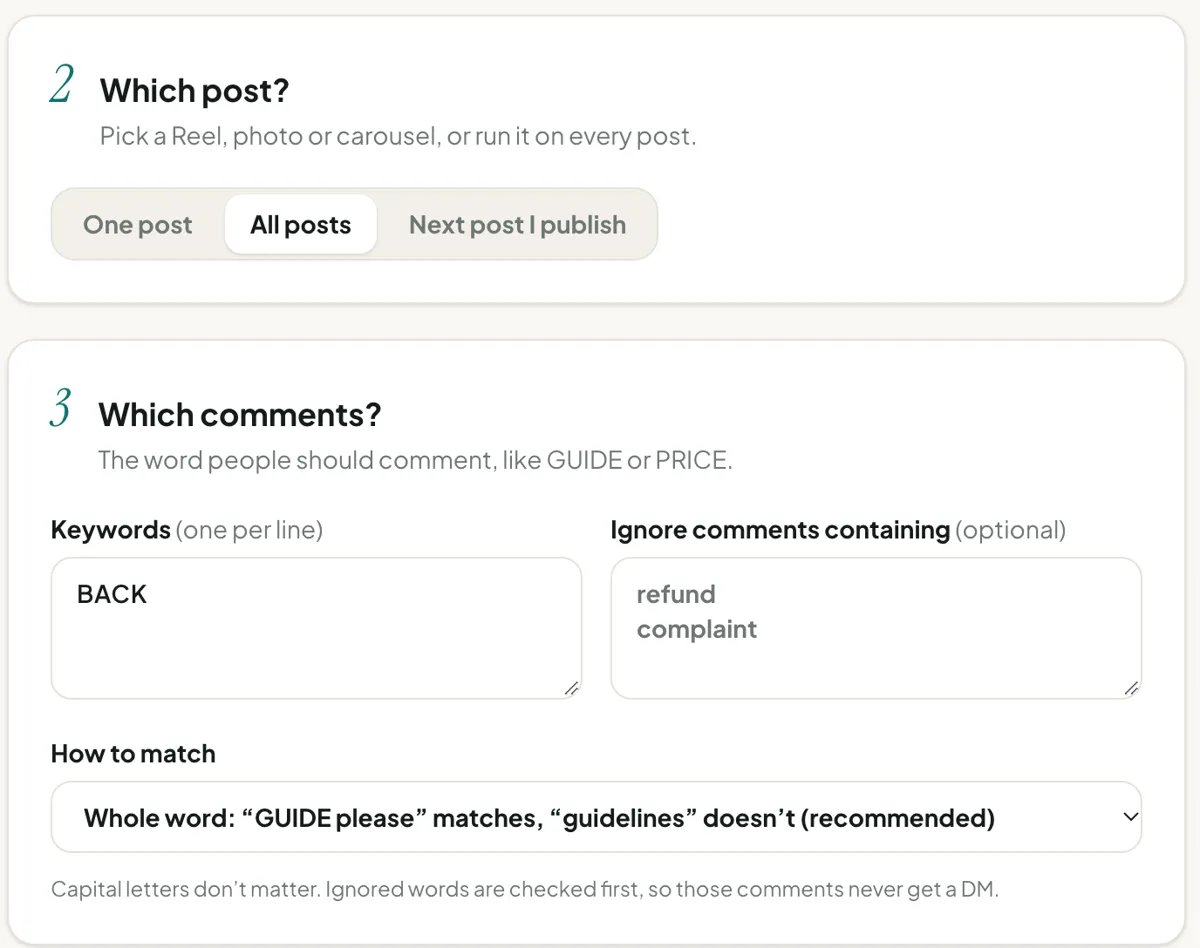
Open Create automation, choose your account and click Refresh latest posts. Pick the Reel, photo or carousel you want to automate.
You can also choose all posts (useful for an evergreen keyword like LINK) or the next post you publish (handy when you set things up before posting).
Step 3: Choose the keyword
Use one short, unusual word: GUIDE, PLAN, PRICE. Avoid everyday words like “yes” or “info”, because people use them in normal comments too.
Leave matching on whole word, so “GUIDE” matches “GUIDE please 🙏” but not “guidelines”. Add exclusions for comments that need a human, such as “refund” or “complaint”.
Step 4: Write the public reply (optional)
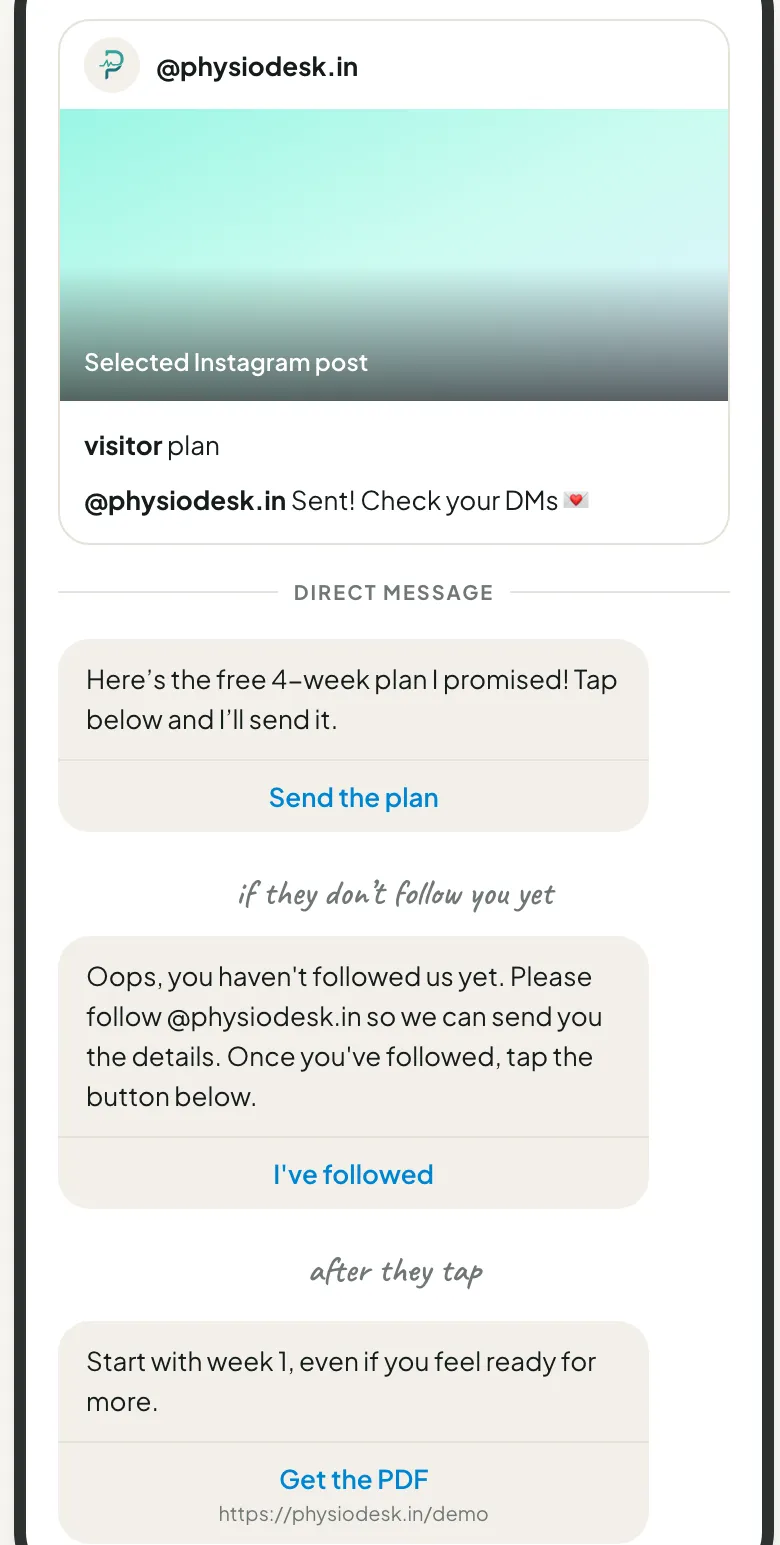
This is the short reply that appears under the comment, like “Sent! Check your DMs 💌”. It tells other people the keyword works, which brings in more comments. Add two or three variations so your comment section doesn't look like a bot wrote it.
Step 5: Write the first DM
Instagram allows exactly one private reply per comment, so this message matters. Keep it short and give one clear next step:
Hi! Here's the checklist you asked for. Tap below and I'll send it over.
That message carries a button, “Send me the details” or whatever you choose (up to 20 characters). The button is what lets you send more messages afterwards. More on why in the rules Meta enforces.
Step 6: Decide on the follower check
If you switch on Require the user to follow, people who tap the button but don't follow you get a polite “Please follow us first” with an I've followed button. Once they follow, they get the link.
Use it for free resources, where it's a fair trade. Skip it for anything people need from you, like booking an appointment or asking about an order.
Step 7: Add the final message and link
This is what people actually came for:
Here's your guide ✨ Start with page 3. That's the part most people skip.
Add a button name (“Open guide”) and the link. The link opens straight from the chat.
Step 8: Switch it on and test it
Set the status to Active and save. Then test it the way your followers will: from a different Instagram account, comment the keyword on the post. Within a few seconds you should see the public reply, the DM, and after you tap, the link.
Mistakes we see most often
- Keyword hidden in the caption. Say it in the Reel itself and in the first line of the caption.
- Testing from your own account. Your own comments are ignored. Use a second account.
- Several offers on one keyword. Use one keyword per offer so you can see which one people want.
- Expecting a reply weeks later. Instagram only allows the first DM within 7 days of the comment, so older comments can't be answered automatically.
That's it. Set it up once and every comment on that post gets answered, whether you're awake or not.